Introduction
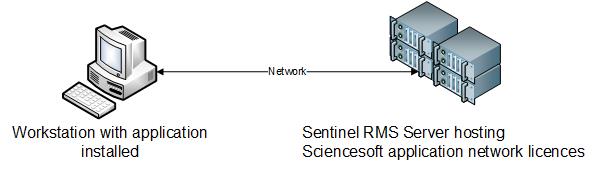
In order to install the network licences for our products, a Sentinel server must be installed on your network. We recommend that network licences are installed on a Sentinel RMS server version 9.8, although network licenses can be installed on any Sentinel RMS server version 8.6 or newer. This server must be accessible by all workstations on the network to allow access from Sciencesoft applications:
Network Licence Types
Currently the following license types are provided:
- LAN: Local Area Network for use within one office block
- RAN: Regional Area network for use within one timezone
- WAN: Wide area network for use globally
In addition to this, configuration details can be provided to limit a subset of the total available licences to a group of end users. This can be by group or IP address
System Requirements
Only one Sentinel server can be run on one computer, therefore if there are other packages using earlier versions of Sentinel, either two Sentinel servers are required (older and newer versions), or licences will need to be transferred to the new 9.8 server which would be installed on the current computer.
Safenet claim that all older Sentinel licence versions should be fine when added to the new 9.8 server.
This server must be accessible by all workstations on the network to allow access from Sciencesoft applications.
The installation files for the Sentinel Server version 9.8 will be provided via an FTP site, or Dropbox link if required, from Sciencesoft Support on request.
The following files should be downloaded:
- Sentinel 9.8 ServerInstall.zip
- Tools98.zip
The Sentinel 9.8 ServerInstall.zip contains the installation files and setup.exe for the Sentinel Server. This should be installed on any PC you wish to use as a server. (Obviously this PC will not be switched off too often).
The contents of the zip files should be extracted to a known location on the workstation that will be running this software. The Setup executable should then be run using an account that has local administrative access.
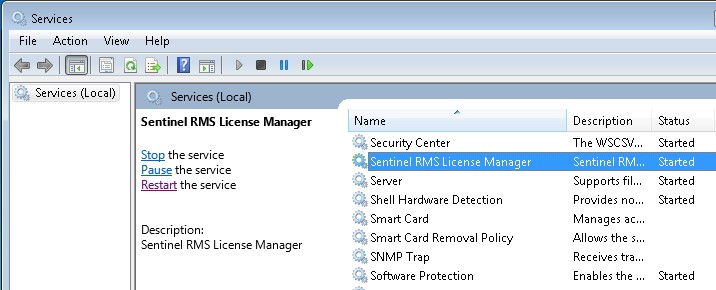
Once installed, the Sentinel RMS License Manager service will be displayed in the list of available Services on the server
Sentinel RMS Tools
The Tools98.zip file must be unzipped and copied to a permanent location on your Sentinel server. This .zip file contains at least the following important applications:
- Wechoid: used to identify the locking criteria used in licence creation
- WlmAdmin: Used to add licence files to the Sentinel RMS server
There is no installation required to run these applications.
Details on the Wechoid details required can be found here:
Network licence Wechoid data requirements
Details on installing new network licences on the Sentinel RMS server and network licence allocation details can be found here:
Licence file installation and allocation