Introduction
To generate the network licences for our products, the Locking Data details must be provided from the Wechoid application. The Locking Data values are changed as the available Locking Criteria check boxes are updated. The codes generated, are specific to the server or workstation that the Wechoid is run on. As such any licence file generated with these codes, can only be installed on this Sentinel server.
Wechoid Details
To clarify, it is the Locking Data Selector and Code values at the bottom of the Wechoid application that we require here:
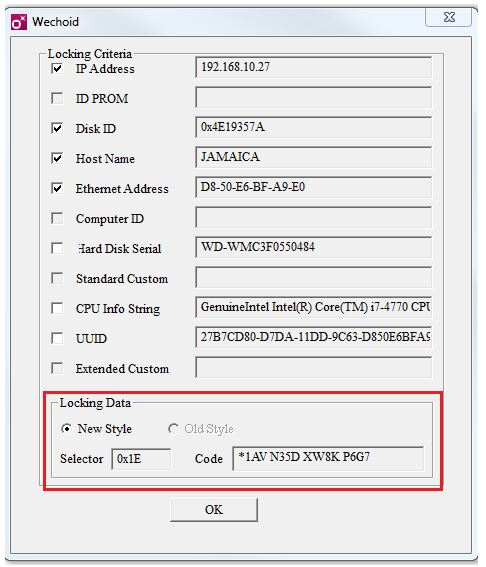
These should match the following details:
- Selector: 0x1E
- Code: starts with *1
These are changed depending on the Locking Criteria options selected. Feel free to try this.
Unfortunately we cannot recreate the Selector and Code details based on any Locking Criteria supplied. These are unique to the hardware the Wechoid application is run on. This ensures licence files created can only be installed on this hardware.
To set the correct Selector and Code details, please follow these steps:
- Launch the Wechoid application on the same hardware that has the Sentinel server installed on.
- Ensure all check boxes are unselected. So the Wechoid will look similar to:
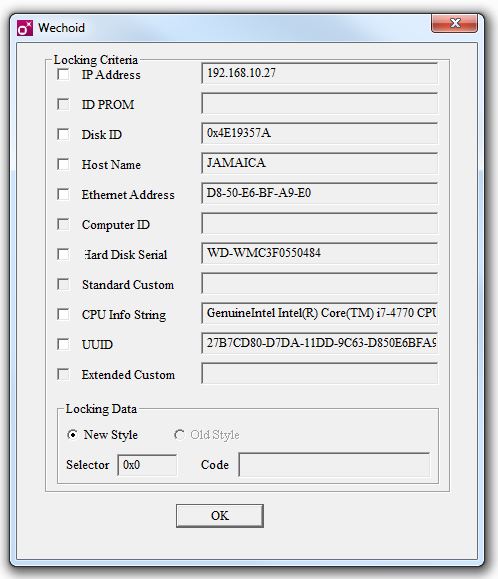
Note these can be unselected by clicking on them with the mouse.
- Select only the following 4 Locking Criteria items:
- IP Address
- Disk ID
- Host Name
- Ethernet Address
These should be items that do not change on a server reboot. However if the IP Address is not fixed, this can be omitted and will result in a Selector with value 0x1C.
- The following Locking Criteria should not be selected:
- Hard Disk Serial
- CPU INFO String
- UUID
As such the Wechoid application should now look similar to:
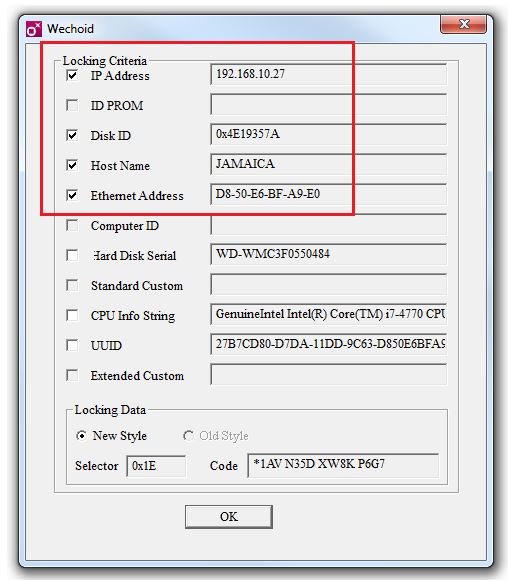
With the important Locking data values similar to:
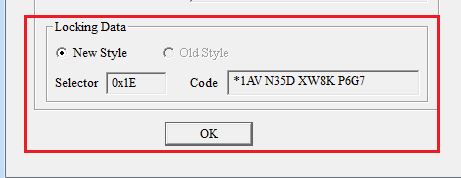
If you can provide a screen shot of the Wechoid with the detailed Locking Criteria selected and the Locking Data Selector with value 0x1E, the licence files can be created.