Introduction
The following applications are provided to identify the current licence users. Although these applications can provide this information, they cannot be used to stop a user accessing licences.
WlmAdmin:
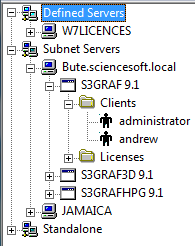
This is the application that is used to add network licences to the Sentinel Server. Expand the Sentinel server in the treeview followed by the Feature name then Clients folder to see who has used licences. For example:
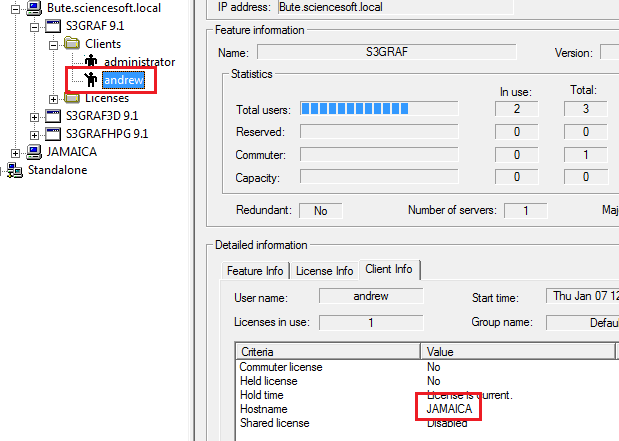
Selecting each Client in turn will display the Hostname in the bottom right. For example:
Note the WlmAdmin application does not allow sessions to be terminated.
S3who
This application was created to display the available licence components hosted on a Sentinel server. This can be filtered to display only the licences in use and can be set to Auto-Refresh to provide real time details on licence usage.
The application is available for download from our FTP site on request and can be installed on a workstation using the usual administrative access.
When launched, enter the Sentinel server name in the 'Server' field and click on Refresh to display the list of installed licence components. For example:
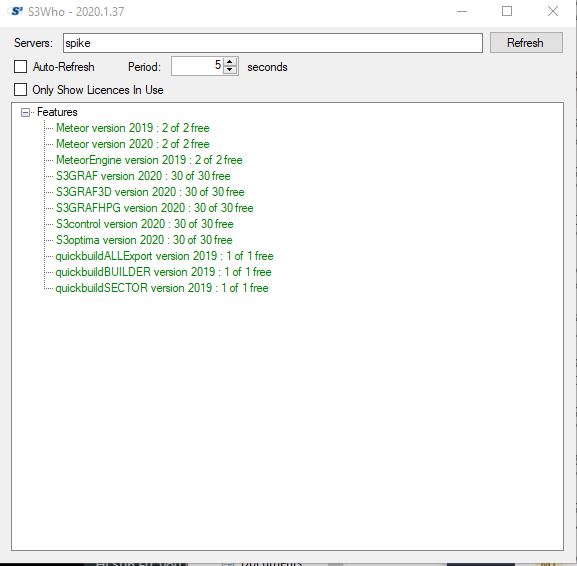
Note if any licences are currently being used, they will appear with a '+' sign in the treeview. These can then be filtered by selecting the 'only Show Licences in Use' check box.
In addition if the 'Auto-Refresh' check box is also selected, this will refresh the screen as per the Period time in Seconds to indicate the licence usage changes with time.
This application is available from support@sciencesoft.com on request.