Introduction
To simplify the licence request generation process, an application has been created that will output the required codes to allow either a Standalone or Network licence to be created. This application must be run on the system that the licence is to be generated for and can provide either code provided the appropriate radio button is selected.
S3Licence Download Details
The download details for the 'S3Licence.zip' file, from the FTP or Dropbox sites, will be provided by Sciencesoft Support on request. Once downloaded, this file requires to be unzipped to a temp folder on the system that will be utilising the installed licenses as detailed below:
- Network Licence: C: drive on the hardware that is running the Sentinel Server software
- Standalone Licence: C: drive on the local workstation
No further installation steps are required to allow this to run.
S3Licence: Network Licence Code
To provide the required codes from a server that will be running the Sentinel RMS server software, select the Network radio button:
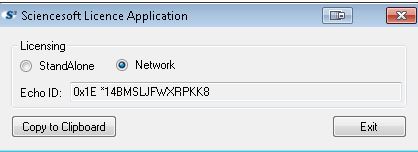
Note this application should be run on the hardware that will be running the Sentinel Server software.
Select the 'Copy to Clipboard' and paste this into an email to Sciencesoft Support
S3Licence: Standalone Licence Code
To provide the required codes from a workstation that will be running S3GRAF, S3schedule, S3chembuild, S3control or S3quickbuild, with a locally installed standalone licence, select the Standalone radio button:
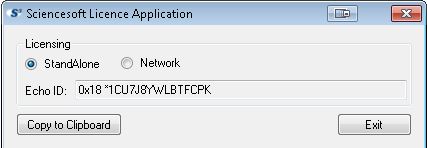
Note this application should be run on the workstation or laptop that will be used for the standalone licence.
Select the 'Copy to Clipboard' and paste this into an email to Sciencesoft Support
Once received, new licence files can be created and issued with the appropriate installation instructions